Filters and Time Range
Use the header section of the mobile interface to control filter scope and time selection for all KPI and printer cards.
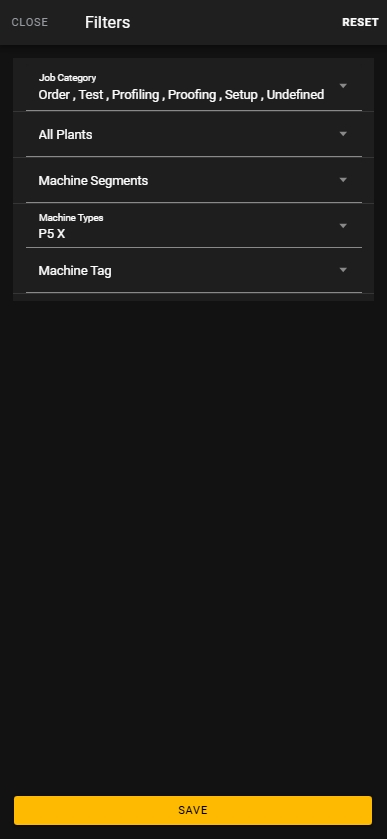
Filters
Tap the filter icon in the top-right corner to open the filter dialog.
Supported filter dimensions:
- Job Category
- Plant
- Machine Segment
- Machine Type
- Machine Tag
You can select multiple values per filter.
Select Reset to clear all filters.
Select Save to apply the current filter configuration.
Time range
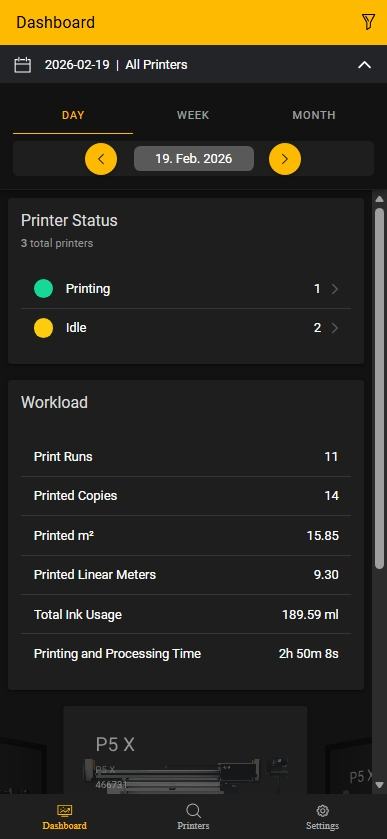
Tap the time area in the header to open the time controls.
Available time modes:
- DAY: Displays data for a specific calendar day
- WEEK: Aggregates data by calendar week
- MONTH: Aggregates data by calendar month
Use the left and right arrows to navigate between periods.
In DAY mode, tap the displayed date to open the calendar and select a specific day.
Recommended workflow
- Configure printer and attribute filters first.
- Select the required time mode (DAY, WEEK, or MONTH).
- Navigate to the relevant period.
- Verify that KPI and printer cards reflect the selected filter and time scope.
Active filters
Always verify active filters before comparing KPI values across periods or printers.